
The picture is the easy half.
They all draw Market Profile. Two of them draw it free. Drawing it was never the hard part, so watch what happens next instead.
- 09:47VA testES testing prior VAH, prior VA 7677.50 to 7717.50 (2026-08-20)
- 11:02Reject highES rejected at prior VAH (failed auction up), prior VA 7677.50 to 7717.50 (2026-08-20)
- 13:26Naked POCES testing naked POC 7697.50 from 2026-08-20
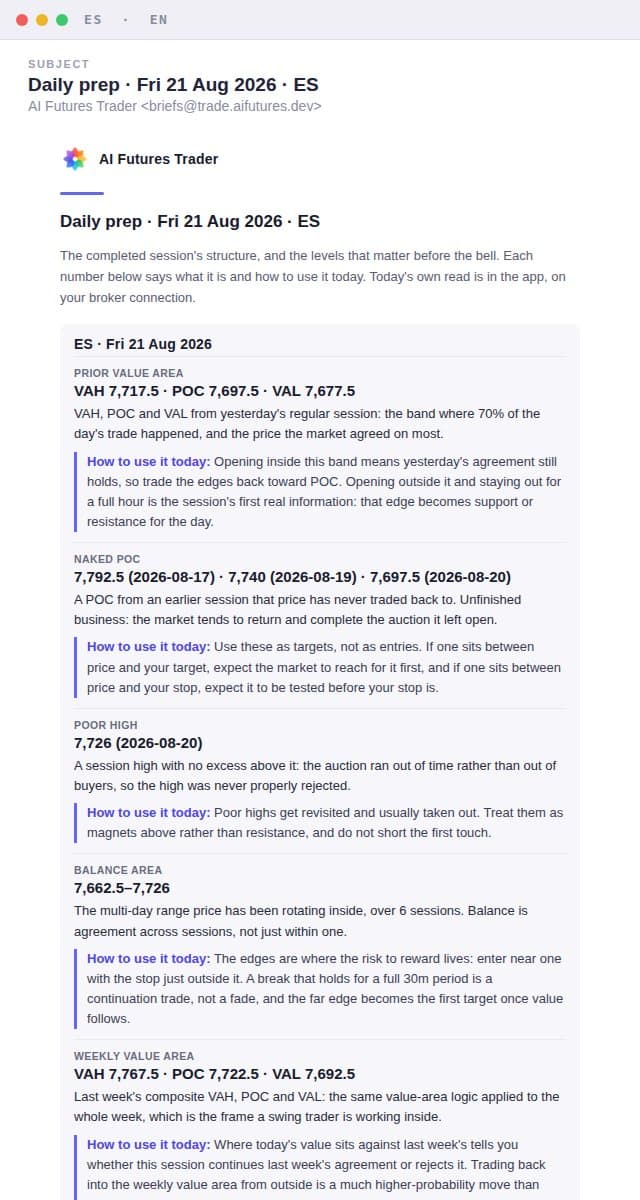
This is what lands at 08:15.
The demo above is a demo. This is the mail itself: the same session, rendered by the exact code that sends it every morning. Each number says what it is and how to use it; the session trading right now is read in the app, on your broker connection.
Eight questions, answered both ways.
Open the one you came for. Every row carries the thing we would rather you did not find out on your own.
The chart is ready when you are. You open yesterday's profile, read the value area yourself, decide the bias yourself and write your own plan. Every platform here gives you excellent drawing tools and leaves the reading to you.
A written brief per market lands before the open with the completed session's value area, its naked POCs and poor extremes, the balance it is trading inside and the releases due. Every number carries one line saying what it is and one line saying how to trade it in that session.
The catch: The mail carries the COMPLETED session only. The live bias, the overnight read and the if-then scenarios are in the app, not in your inbox, because live futures data reaches you under your own broker connection rather than ours, and because a mail sent at 08:15 and read at 09:40 cannot correct itself when the gap it describes has already filled. Jigsaw Trading also sells a daily written pre-market briefing, for seven markets to this one's four, delivered inside their own platform and led by news rather than profile structure.
Not applicable, and that is fair rather than a failing. Five of the six make no calls at all, so there is nothing to score. The one that does publish a briefing carries a disclaimer that markets do not always react the same way, rather than an accuracy figure.
Every naked POC listed in the scheduled morning brief is graded after the close by a fixed mechanical rule and published without a sign-in: did the completed session actually trade that level. Practice Lab next-open calls have their own published record. Hit count and sample size sit next to every percentage.
The catch: Live bias and gap readings are not scored on this public board because they are not sent in the scheduled mail. They stay in the app under the live source available to the account; counting an operator snapshot that no customer received would be hindsight, not accountability. The published record is young, so read it as a small sample being built in the open.
TradingView's own TPO indicator classifies normal, trend and neutral days. Conditional session statistics are available to a TradingView user today from third-party scripts and statistics sites, some with several thousand ES and NQ sessions behind them. What no charting platform ships is a maintained first-party statistics engine wired to this morning's actual open.
Shortly after the bell the actual open is classified by opening type, position against prior value and Dalton pattern, then matched against our own graded table: how often a session that started this way broke the initial balance high, how often it broke the low, with the effective sample beside it. A notification tells you it is ready and links you to it in the app.
The catch: It is not in the mail, and that is deliberate: a classification of the session trading right now is live data, so it reaches you under your own broker connection rather than ours, and a mail cannot correct itself once the session moves on. You need a connected broker to read it. Our history is also thin next to a public dataset of a few thousand sessions, and when the effective sample falls below six no odds are quoted at all, which means some mornings you get no probability.
The platform draws it and assumes you know what it means. That assumption is usually right for their audience. Jigsaw bundles roughly ten hours of order-flow education with a licence, and TradingView has an enormous free community library.
Every row of every mail is four things: the name of the number, the number, what it is, and how to trade it today. The site adds eight interactive Market Profile lessons that build the concepts in order.
The catch: Lesson progress is stored in your browser, so it does not follow you to another device or another browser and it is not tied to your account. TradingView, GoCharting and ATAS all sync workspaces server-side, which is a place they are ahead of us.
Interfaces are localized to varying degrees and some have Vietnamese-speaking communities, but the analysis, the documentation and the education are written in English.
The product is bilingual end to end, including the mails. Both languages are written from one set of numbers, so the English brief and the Vietnamese brief cannot quote two different mornings. Desk vocabulary stays English inside the Vietnamese, because POC, VAH, value area and initial balance are the words already on your chart.
The catch: This covers what we write. Anything relayed from an outside source stays in its own language, and a handful of rows stored before the bilingual fields existed are English only.
Every platform has alerts, and TradingView's alerting is more flexible than ours, reaches a first-class mobile app and has years of reliability behind it. On most platforms you define the level and the condition yourself.
The levels come from the profile the engine already computed: value area rejections, initial balance breaks, naked POC touches and your own armed plan levels, fanned out to your Discord, Telegram, email and phone with the reason written into the message.
The catch: TradingView wins this one outright on flexibility, mobile and reliability. The only reason to use ours is that it fires on profile structure you would otherwise have to define by hand every morning.
Real-time CME costs extra almost everywhere, and the amount varies a lot. As of August 2026 TradingView is a few dollars a month for non-professional CME, while a full professional-grade feed with depth elsewhere runs into the tens of dollars a month and can require a verified funded trading account to keep the non-professional rate.
No exchange fee is charged here. Paying customers run live data under their own broker connection, which is what the data licence requires, and the product uses that connection rather than reselling a feed.
The catch: This is a licensing rule rather than a giveaway, and it cuts against us before it cuts for us. Until you connect a broker the product is delayed: it holds back the session in progress and shows you the most recent completed one instead. How far back you can look is set by your plan, not by the delay.
Two of the six draw Market Profile on a free plan, at zero cost, forever. TradingView's entry plan is cheaper than our Pro. A standalone desktop package with full TPO sits around the middle of our two tiers. On price alone, several of them beat us.
Free includes the latest completed ES session and needs no card. Pro is $19 a month or $190 a year, Elite $49 a month or $490 a year. BOTH paid tiers run live on your own broker connection: until you connect one you see the most recent completed session, whichever tier you are on.
The catch: Price is not our argument and we will not pretend otherwise. If the deciding factor is cost, a free plan elsewhere already draws the profile and you should take it. What is being sold here is the writing, the odds attached to today's open and the scoreboard, and none of that is worth anything to you if you would not read it.
Where they beat us, plainly.
Most of these companies are older, larger and better funded, and their products are excellent at things this one does not attempt. If any line below is what you actually need, buy theirs. You will probably keep paying one of them alongside this.
Do not buy this if.
- You trade something other than ES, NQ, GC or CL. Those four are the whole coverage today.
- What you actually want is a chart. Buy a charting platform, and keep it. This is meant to sit upstream of one, not replace it.
- You trade from the tape, the DOM or a heatmap. There is none of that here and there will not be.
- You need to place and manage orders in the same window. Nothing here sends an order to a broker.
- You work only from a phone. Alerts reach you there, but the screens that matter want a desktop.
- You will not read a few hundred words before the open. The writing is the product; without that habit there is nothing here for you.
- You want entry signals to follow without thinking. Every scenario here is a condition to wait for, and if it never prints there is no trade.
Still here? Then the thing you want is a second opinion that shows up before the open, says what it thinks in plain language, and lets you check whether it has been right. Start on the free plan and judge the scoreboard before you judge the price.